THE INDUSTRIAL CANTEEN CHALLENGE
A simple question, yet one that has to be answered
from scratch every day
Thousands of workers, multiple shifts, overtime, leave and unplanned guests.
When the numbers pass through Excel, phone calls and messages, small discrepancies add up to big waste.
MANUAL CONSOLIDATION
Meal orders via Excel and
messages
Every department reports its numbers differently. Admin staff spend hours adding them up, and the final figure can still be wrong.
COOKING BY ESTIMATE
Surplus gets thrown away, shortages cause complaints
phàn nàn
The kitchen has no exact numbers per shift and time slot, so it has to over-cook to be safe.
HARD TO CONTROL
Duplicate meals, wrong shifts, no
registration
Paper vouchers and printed lists cannot stop one person from taking two meals or eating in the wrong shift.
SLOW RECONCILIATION
Discrepancies only show up
at month end
Reconciling registered, cooked and actually served meals with the caterer takes days and easily leads to disputes.
QUY TRÌNH KHÉP KÍN
6 steps, from time attendance data to every meal served
People only need to review and approve. Consolidation, order transfer and reconciliation are handled by the system.
Step 01
Input data synchronization
Time attendance, HR and shift plan data flow into SmartBiz automatically, grouped by shift and department.
System Step 02
Automatic meal planning
The system calculates demand by shift, staff group and serving point. The person in charge only needs to double-check.
System
Step 03
Admin reviews and locks the plan
Adjust directly in the system and lock the plan with one click. Every change has a clear status.
Admin / HR
Step 04
The kitchen receives the order
The kitchen screen shows how many meals to cook per shift, time slot and canteen. The kitchen confirms the order and starts preparing.
Kitchen Step 05
Meal verification
A sensor wakes the kiosk when someone approaches. With a single QR, RFID or face scan, the system checks the registration, meal shift and meal status.
EmployeeKiosk
Step 06
Real-time reconciliation
Adjust directly in the system and lock the plan with one click. Every change has a clear status.
SystemManager
SOLUTION COMPONENTS
Software and devices
designed to work together
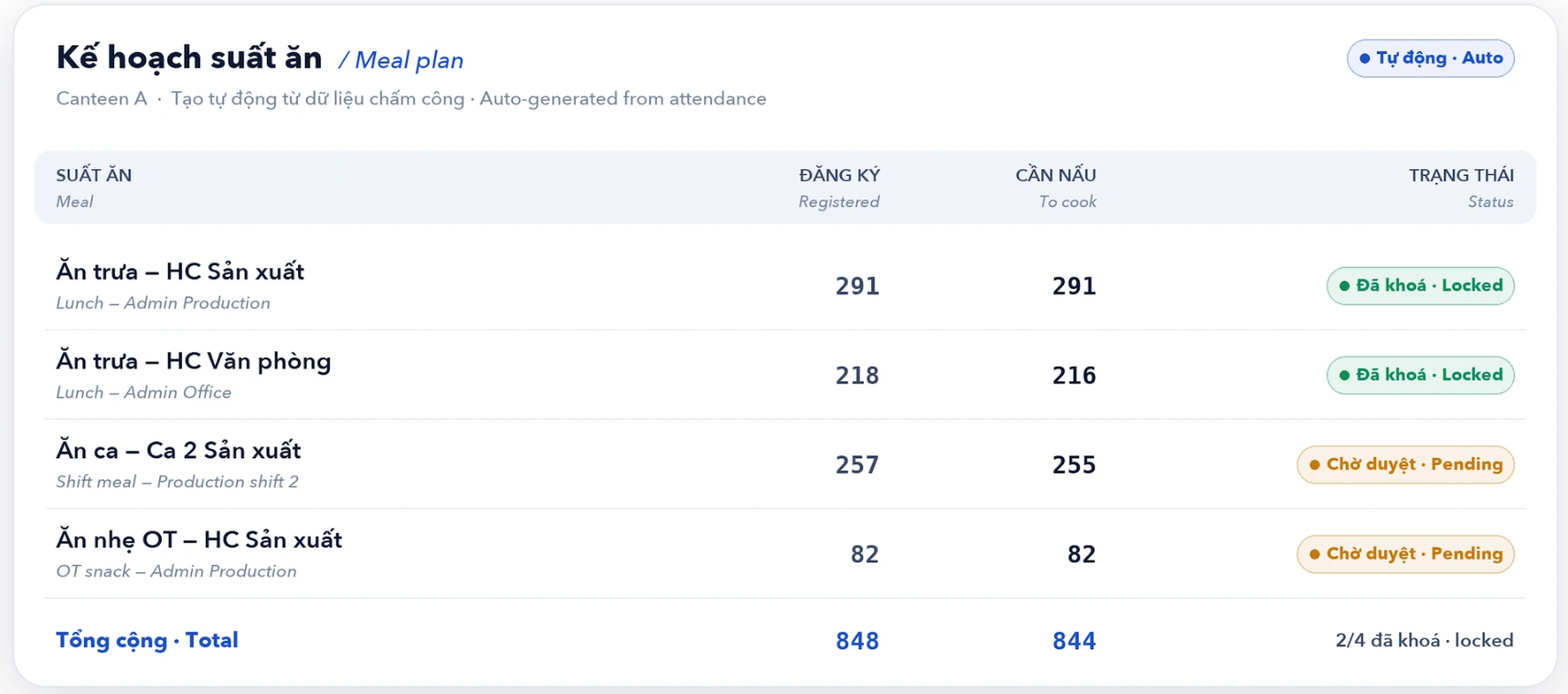
ERP platform - Meal planning
WebPlans are generated automatically by day, shift and canteen. Admin staff review, lock and approve them on a single screen.
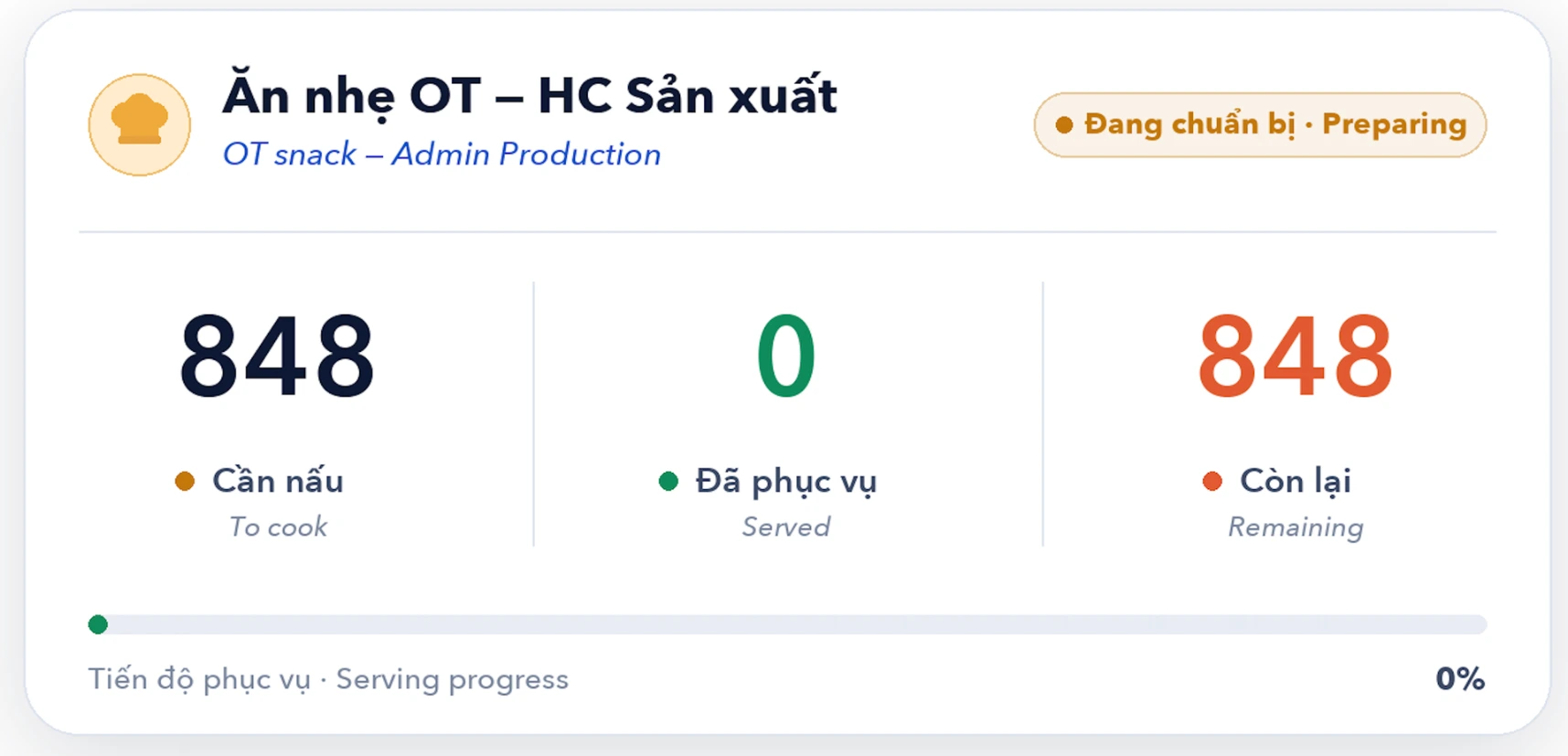
Kitchen display
Tablet/ TVKitchen orders are sent automatically once the plan is locked. No more taking numbers by phone or email.
Meal verification kiosk
Kiosk 1Placed at the canteen entrance, it verifies each meal
in an instant.
A sensor activates automatically when someone approaches
- Scan the QR code on the employee badge, RFID, face recognition or a guest voucher
- Success is confirmed by sound and on screen
- Rejects with a reason when invalid
Meal registration kiosk
Kiosk 2
For guests and needs outside the plan.
- View the menu by shift, register new or additional meals
- Cancel or adjust meals on the spot
- Send requests to Admin for approval
- Print meal vouchers with a unique QR code


Quét trùng
This meal has already been used and cannot be claimed again.
Sai ca
The employee scanned during another shift's time slot.
Outside time slot
Scanned when the serving point is not yet open or the meal has closed.
Not registered
No meal in today's plan.
Wrong serving point
The meal is registered for another canteen.
Wrong meal time
A voucher for this meal type is being used for another meal.
Every invalid meal is blocked right at the kiosk
The system checks before confirming, shows a clear reason and logs the exception for reconciliation. No more one person taking two meals or eating in the wrong shift.
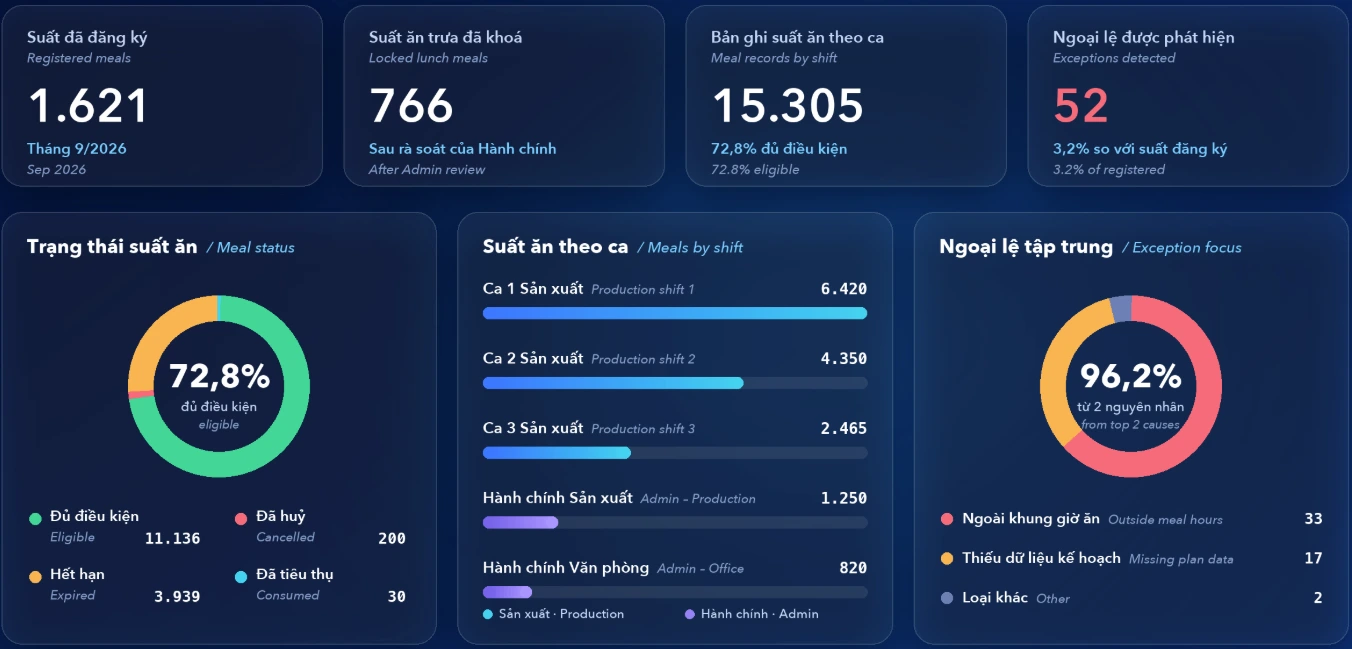
The whole canteen at a glance on one screen
Registered, cooked and actually served meals, and exceptions, are consolidated automatically.
Managers monitor in real time, without waiting for end-of-day reports.
Sample data from the demo environment - the live dashboard shows your company's own data
THE RESULTS
Fewer steps, fewer discrepancies,
costs under control
MANUAL WORK
Less manual work
Meal plans are created automatically from time attendance data.
DISCREPANCIES
Fewer discrepancies
QR and face verification at the kiosk, consistent data from a single source.
SPEED
Fast response
Cooking orders reach the kitchen as soon as the plan is approved.
TRANSPARENCY
Transparent data
Every meal and every exception leaves an audit trail.
CHI PHÍ
Optimized costs
Cook exactly what is needed, reducing surplus meals and losses.
WHY YOU CAN BE CONFIDENT
Validate it in your own canteen,
before you decide
Instead of a sales pitch, we show you the system
running for real and measure the results with your own company's data.
REAL DEMO
See the system in operation
The whole process on this page is real operation of the software and kiosks, from time attendance to the dashboard. You can try scanning yourself during the demo.
PILOT
Pilot in one canteen
Pilot in one canteen or one shift, compare the figures before and after, then roll out to the whole plant.
ECOSYSTEM
Part of the ERP
The canteen shares data with the existing modules, with no re-entry.
CanteenHRProjects
PURPOSE-BUILT DEVICES
Kiosks built for factory environments
Portrait touch screen, camera, QR and contactless card reader, thermal voucher printer, and a presence sensor.
CONTROL
Clear access rights and audit trails
Plans, approvals and exceptions all record who did what, when and with what status. The data belongs to your company.
CONTINUOUS OPERATION
No interruption when the network goes down
The kiosk keeps recording scans and syncs automatically when the connection is restored, so meal times are not affected.
Demo: digitalizing HR management for factories
Introducing the HR management system